

The “1 to 10 Content Multiplication System”: How to Create Once, Post 10 Times (and Never Run Out of Content Again)
The 68-Year-Old Retired Teacher Who Posts 50X Per Week (and Only Works 3 Hours)
Meet Patricia, 68, former high school English teacher turned “productivity coach for retirees.”
Patricia’s nightmare (Month 1 of her online business):
She knew she needed to “show up” on social media to build her audience.
So she committed to posting content:
- ✅ 1 YouTube video per week
- ✅ 3 Facebook posts per week
- ✅ 2 LinkedIn articles per week
- ✅ Daily Instagram Stories
- ✅ 1 email newsletter per week
Total weekly output: 10+ pieces of content
Time required: 15-20 hours/week
Patricia’s reaction after Week 3:
“This is INSANE. I’m spending every waking hour creating content. I haven’t sold a single thing because I’m too busy making videos and writing posts. I’m exhausted.”
Sound familiar?
The “Content Hamster Wheel” is real.
You feel like you need to be EVERYWHERE, posting CONSTANTLY, or you’ll be invisible.
But here’s the truth:
You don’t need to create MORE content. You need to REPURPOSE smarter.
Let me show you how Patricia went from 20 hours/week creating 10 pieces of content to 3 hours/week creating 50+ pieces of content using what I call the “1 to 10 Content Multiplication System.”
The Breakthrough: Patricia’s “One Video, 50 Posts” Strategy
Here’s what changed everything for Patricia:
Old system (the hamster wheel):
- Monday: Write YouTube script (2 hours)
- Tuesday: Record & edit YouTube video (3 hours)
- Wednesday: Write Facebook post from scratch (1 hour)
- Thursday: Write LinkedIn article from scratch (2 hours)
- Friday: Create Instagram graphics and captions (2 hours)
- Weekend: Write email newsletter from scratch (3 hours)
Total time: 13+ hours/week
Total output: 5-7 unique pieces of content

New system (the multiplication machine):
Monday morning (3 hours total):
Step 1: Record ONE 15-minute YouTube video teaching ONE valuable lesson
Example: “How Retirees Can Find Their First Online Client in 7 Days”
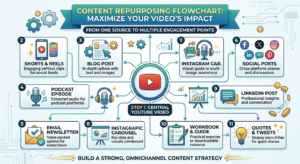
Step 2: Use AI tools to transform that ONE video into:
✅ 1 YouTube video (15 min)
✅ 5 YouTube Shorts (60-90 sec clips from the main video)
✅ 5 Facebook posts (key quotes + insights from the video)
✅ 5 LinkedIn posts (professional version of Facebook posts)
✅ 5 Instagram Reels (same as YouTube Shorts)
✅ 1 podcast episode (audio extracted from video)
✅ 1 blog post (transcript cleaned up, 1,500-2,000 words)
✅ 10 tweet threads (bite-sized insights from the video)
✅ 1 email newsletter (summary + CTA)
✅ 5 Instagram carousel posts (key steps visualized)
✅ 10 Instagram Story slides (quick tips)
✅ 1 Pinterest pin (infographic summarizing the video)
Total output from ONE 15-minute video: 50+ pieces of content
Time required: 3 hours (recording + AI-assisted repurposing)
Patricia’s reaction:
“Wait. You’re telling me I can create ONCE and post for the entire MONTH?”
Exactly.
Welcome to the “1 to 10 Content Multiplication System.”
Let me break it down step-by-step so you can do this too.
The “1 to 10 Content Multiplication System” (The 4-Step Formula)
Here’s the exact process Patricia uses (and you can steal):
Step 1: Create Your “Pillar Content” (The Foundation)
What is “Pillar Content”?
One LONG-FORM, HIGH-VALUE piece of content that teaches something meaningful.
Examples:
- ✅ 10-20 minute YouTube video
- ✅ 30-60 minute podcast episode
- ✅ 1,500-2,500 word blog post
- ✅ 45-minute webinar
- ✅ Live workshop or training
The key: This is your “source material” that you’ll break into smaller pieces.
Patricia’s weekly pillar content:
Every Monday morning, Patricia records ONE 15-minute YouTube video teaching ONE concept.
Example topics:
- “How to Use LinkedIn to Land Your First Consulting Client”
- “The 3-Step System for Pricing Your Coaching Services”
- “How to Build a $5K/Month Business Working 10 Hours/Week”
Time to create: 2-3 hours (planning, recording, light editing)
Output: 1 video (the goldmine)
Step 2: “Atomize” Your Pillar Content (Break It Into Pieces)
What is “atomization”?
Taking your BIG piece of content and breaking it into 10-20 SMALLER pieces.
Kevin Fahey’s philosophy:
“Content can be recycled in many ways. If you created content in the past, you could use this.”
Translation: ONE video = 10+ smaller assets
Here’s how Patricia “atomizes” her 15-minute YouTube video:
From Patricia’s video: “How to Use LinkedIn to Land Your First Consulting Client”
The video covers:
- How to optimize your LinkedIn profile
- How to identify your ideal clients
- How to send connection requests that get accepted
- How to start conversations that lead to sales calls
- How to close your first client
Patricia’s atomization:
✅ YouTube Shorts (5 clips):
- Clip 1: “The #1 LinkedIn Profile Mistake Retirees Make” (60 sec)
- Clip 2: “How to Find Your Ideal Client on LinkedIn in 5 Minutes” (60 sec)
- Clip 3: “The Connection Request Template That Gets 80% Acceptance” (90 sec)
- Clip 4: “How to Start a Sales Conversation (Without Being Pushy)” (90 sec)
- Clip 5: “The Closing Question That Lands Clients” (60 sec)
✅ Facebook Posts (5 posts):
- Post 1: “I was terrible at LinkedIn until I fixed THIS one thing…” (quote from video)
- Post 2: “Here’s how I find 10 ideal clients every day on LinkedIn…” (step-by-step)
- Post 3: “My connection request template (80% acceptance rate)…” (template shared)
- Post 4: “Most retirees think LinkedIn is for job hunting. WRONG…” (mindset shift)
- Post 5: “I landed my first $2K client using this exact LinkedIn strategy…” (case study)
✅ LinkedIn Posts (5 posts):
- Same as Facebook, but reworded in a more professional tone
✅ Email Newsletter (1 email):
- Subject: “How I Got My First LinkedIn Client in 7 Days”
- Body: Summary of the video + link to watch full video
✅ Blog Post (1 article):
- Title: “The Complete LinkedIn Client Acquisition Guide for Retirees”
- Content: Full transcript of the video (cleaned up, 2,000 words)
✅ Tweet Threads (3 threads):
- Thread 1: “5 LinkedIn mistakes retirees make (and how to fix them)”
- Thread 2: “My LinkedIn client acquisition system (step-by-step)”
- Thread 3: “I landed 3 clients in 30 days using LinkedIn. Here’s how…”
✅ Instagram Carousel (1 post):
- 10 slides: “10 LinkedIn Tips for Retirees Starting a Consulting Business”
✅ Pinterest Pin (1 infographic):
- “LinkedIn Client Acquisition Blueprint” (visual summary)
Total pieces of content from ONE video: 25+
Time to atomize: 1-2 hours (using AI tools like ChatGPT, Descript, OpusClip)
Step 3: Schedule Your Content (Set It and Forget It)
Patricia’s scheduling system:
She uses Buffer (or Hootsuite, Later, or CoSchedule) to schedule ALL her repurposed content for the ENTIRE month.
Monday (3 hours):
- Record 1 pillar video
- Atomize into 25+ pieces
- Schedule everything for the next 7-30 days
Tuesday-Sunday:
- Content posts automatically
- Patricia focuses on ENGAGEMENT (replying to comments, DMs, building relationships)
Result: Patricia “shows up” 50+ times per week, but only CREATES content 3 hours/week.
Tools Patricia uses:
- ✅ Descript (transcribes video, cuts clips automatically)
- ✅ OpusClip (creates short clips from long videos using AI)
- ✅ ChatGPT (rephrases video insights into social posts)
- ✅ Canva (creates graphics and carousel posts)
- ✅ Buffer (schedules posts across all platforms)
Total cost: $50-$100/month (or use free versions)
Step 4: Engage and Optimize (The 80/20 Rule)
Here’s the secret most people miss:
Creating content = 20% of the work.
Engaging with your audience = 80% of the results.
Patricia’s daily routine (after automating content):
10:00 AM – 10:30 AM:
- Reply to comments on YouTube, Facebook, LinkedIn
- Answer DMs on Instagram
- Engage with other people’s posts (comment, like, share)
That’s it.
30 minutes/day of ENGAGEMENT beats 3 hours/day of CREATING.
Why?
Because social media algorithms REWARD engagement.
The more you comment, reply, and interact, the more your content gets shown.
Patricia’s results (Month 3):
- ✅ 1,200 YouTube subscribers
- ✅ 3,500 email subscribers
- ✅ 15,000 LinkedIn connections
- ✅ $8,500/month revenue (from coaching and courses)
Time worked per week: 10-12 hours (3 hours creating, 7-9 hours engaging/selling)
The “1 to 10” Content Multiplication Cheat Sheet
Let me make this STUPID SIMPLE for you.
Here’s the exact formula to turn 1 piece of content into 10+ pieces:
Formula #1: Video → Everything
Start with: 1 YouTube video (10-20 min)
Transform into:
- YouTube video (main content)
- 5-10 YouTube Shorts (60-90 sec clips)
- 5-10 Instagram Reels (same as Shorts)
- 5-10 TikToks (same as Shorts)
- 1 podcast episode (extract audio)
- 1 blog post (transcript, cleaned up)
- 1 email newsletter (summary + link)
- 5-10 social media posts (quotes, insights)
- 1 carousel post (Instagram/LinkedIn)
- 5-10 Instagram Stories (quick tips)
Total: 40-60 pieces from 1 video
Formula #2: Blog Post → Everything
Start with: 1 blog post (1,500-2,500 words)
Transform into:
- Blog post (main content)
- 1 email newsletter (summary + link)
- 5-10 social media posts (key points)
- 1 carousel post (Instagram/LinkedIn, 10 slides)
- 5-10 tweet threads (bite-sized insights)
- 1 video script (read blog post on camera)
- 1 infographic (Pinterest pin)
- 10 Instagram Stories (quick tips)
Total: 30-40 pieces from 1 blog post
Formula #3: Podcast → Everything
Start with: 1 podcast episode (30-60 min)
Transform into:
- Podcast episode (audio)
- 1 YouTube video (upload audio with static image or waveform)
- 5-10 short clips (YouTube Shorts, Reels, TikToks)
- 1 blog post (transcript)
- 1 email newsletter (summary + link)
- 5-10 social media posts (quotes, insights)
- 1 carousel post (key takeaways)
- 5-10 Instagram Stories (tips)
Total: 30-50 pieces from 1 podcast
Formula #4: Live Workshop/Webinar → Everything
Start with: 1 live webinar (45-90 min)
Transform into:
- Webinar replay (YouTube, members area)
- 10-20 short clips (YouTube Shorts, Reels, TikToks)
- 5-10 social media posts (key insights)
- 1 blog post (summary, 2,000+ words)
- 1 email series (5-7 emails recapping key points)
- 1 lead magnet PDF (slides + notes)
- 1 carousel post (key slides visualized)
- 1 podcast episode (audio from webinar)
Total: 30-50 pieces from 1 webinar

The “Content Multiplication” Tools (Kevin’s Stack)
Here are the EXACT tools that make this system easy (even for tech-challenged retirees):
For Video Repurposing:
✅ Descript ($12/month)
- Transcribes videos automatically
- Cuts clips with AI
- Removes filler words (“um,” “uh”)
- Creates subtitles
✅ OpusClip ($9-$29/month)
- AI finds the BEST 60-90 sec clips from long videos
- Adds captions automatically
- Optimized for virality
✅ CapCut (FREE)
- Simple video editor
- Great for creating Reels/Shorts/TikToks
For Text Repurposing:
✅ ChatGPT (Free or $20/month for GPT-4)
- Rephrases video transcripts into social posts
- Writes email newsletters from blog posts
- Creates tweet threads from long-form content
✅ Otter.ai (Free or $10/month)
- Transcribes audio/video
- Great for turning podcasts into blog posts
For Graphic Creation:
✅ Canva (Free or $13/month Pro)
- Creates carousel posts
- Designs Instagram Stories
- Makes Pinterest pins
For Scheduling:
✅ Buffer (Free for 3 accounts, $6/month for more)
- Schedules posts across Facebook, Instagram, LinkedIn, Twitter
- Simple interface (perfect for beginners)
✅ Hootsuite ($49/month)
- More advanced scheduling
- Analytics included
✅ Later (Free or $18/month)
- Great for Instagram
- Visual content calendar
Kevin Fahey’s “Content Creation Philosophy”
From Kevin’s teachings:
“With ChatGPT you can ask it for ideas on any topic, trust me, I’ve done it and use it in my marketing daily. From creating the product idea, creating the training, sales page, video sales letter, email swipes and anything else you’ll need, ChatGPT can handle it for you.”
Translation:
You don’t need to be a “content creator genius.”
You need to be a “content REPURPOSER genius.”
Create once. Distribute everywhere.
That’s the game.
The “15-Minute Content Creation” Weekly Plan (For Busy Retirees)
All right, let’s make this PRACTICAL.
Here’s a simple weekly plan for retirees who want to dominate social media WITHOUT spending 20 hours/week creating content:
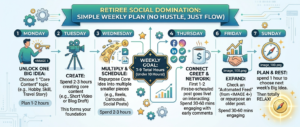
Monday (3 hours):
9:00 AM – 10:30 AM: Record 1 pillar video (15-20 min)
- Topic: One valuable lesson for your audience
- Tool: Smartphone or webcam (don’t overcomplicate)
10:30 AM – 11:30 AM: Atomize the video
- Use Descript to transcribe
- Use OpusClip to create 5-10 short clips
- Use ChatGPT to turn transcript into 5-10 social posts
11:30 AM – 12:00 PM: Schedule everything
- Upload clips to YouTube, Facebook, Instagram, LinkedIn
- Schedule social posts in Buffer
- Write 1 email newsletter (send on Tuesday)
Done. You’ve just created 30-50 pieces of content.
Tuesday – Friday (30 min/day):
Daily engagement:
- Reply to comments on your posts (10 min)
- Engage with other people’s content (comment, like) (10 min)
- Answer DMs and emails (10 min)
That’s it.
Saturday – Sunday:
Rest. You’ve earned it.
Total weekly time: 5 hours (3 hours creating, 2 hours engaging)
Total content output: 30-50 pieces
Feeling overwhelmed? Start smaller:
Beginner Plan (1 hour/week):
Monday (1 hour):
- Write 1 blog post (500-800 words) OR record 1 short video (5 min)
- Use ChatGPT to turn it into 5 social posts
- Schedule for the week
Daily (10 min):
- Engage with your audience
Total weekly time: 2 hours
Total content output: 5-10 pieces
You can ALWAYS scale up later.
Common Content Multiplication Mistakes (and How to Fix Them)
Let me save you some headaches:
Mistake #1: “I Need to Post ORIGINAL Content Everywhere”
The trap: Creating unique content for EVERY platform.
The reality: 90% of your audience will NEVER see the same piece of content twice.
Example:
You post a video on YouTube.
Your YouTube audience: 1,000 people.
You post the SAME video (as a Reel) on Instagram.
Your Instagram audience: 500 people (DIFFERENT people than YouTube).
Overlap: Maybe 50-100 people follow you on BOTH platforms.
Translation: It’s NOT “repetitive.” It’s SMART distribution.
The fix: Repurpose shamelessly. Your audiences are mostly SEPARATE.
Mistake #2: “I Need to Be on EVERY Platform”
The trap: Trying to post on YouTube, Instagram, Facebook, LinkedIn, TikTok, Twitter, Pinterest, etc.
The reality: You’ll burn out in 2 weeks.
The fix: Start with 2-3 platforms where YOUR audience hangs out.
For “Retired to Rewired”:
- ✅ YouTube (long-form teaching)
- ✅ LinkedIn (professional retirees looking for business advice)
- ✅ Facebook (retirees are VERY active here)
That’s it.
Master those 3, THEN expand if you want.
Mistake #3: “I Need Fancy Equipment to Create Content”
The trap: Spending $2,000 on cameras, lights, and microphones before creating anything.
The reality: Your smartphone is good enough.
Patricia’s setup:
- ✅ iPhone 12 (camera)
- ✅ $30 lapel mic from Amazon
- ✅ Natural window light
- ✅ Free video editor (CapCut or iMovie)
Total investment: $30
Revenue generated: $8,500/month
The fix: Start with what you have. Upgrade later IF needed.
Mistake #4: “My Content Needs to Be Perfect”
The trap: Spending 10 hours editing a 5-minute video.
The reality: Done is better than perfect.
Kevin’s philosophy:
“A one time effort to create this content. If you don’t have them, you put the content out. It’s gonna be out forever.”
Translation: Publish IMPERFECT content today > Waiting for perfection tomorrow.
The fix: Aim for “good enough” and publish. You’ll improve over time.
Mistake #5: “I Don’t Know What to Talk About”
The trap: Staring at a blank screen, paralyzed by “I have nothing valuable to say.”
The reality: You have 40-60+ YEARS of life experience. That’s a GOLDMINE.
ChatGPT to the rescue:
Prompt for ChatGPT:
“I’m a retired [profession] helping [target audience] with [outcome]. Give me 50 content ideas for YouTube videos, blog posts, and social media posts.”
Example:
“I’m a retired teacher helping retirees start online coaching businesses. Give me 50 content ideas for YouTube videos, blog posts, and social media posts.”
ChatGPT will give you 50+ ideas in 30 seconds.
Problem solved.
The “Content Calendar” Template (Plan Your Month in 1 Hour)
Want to plan your entire month of content in ONE sitting?
Here’s Patricia’s simple system:
Step 1: Choose 4 Pillar Topics (1 per week)
Example for “Retired to Rewired”:
Week 1: “How to Find Your First Online Client” Week 2: “How to Price Your Coaching Services” Week 3: “How to Build a Simple Sales Funnel” Week 4: “How to Use LinkedIn to Generate Leads”
Step 2: Break Each Topic Into 5-10 Subtopics
Week 1 subtopics:
- The #1 place to find ideal clients
- How to start conversations that lead to sales
- The client acquisition mistake retirees make
- My 3-step client onboarding process
- How I got my first 3 clients in 30 days
Step 3: Create 1 Pillar Video Per Week
Week 1: Record “How to Find Your First Online Client” (15 min)
Week 2: Record “How to Price Your Coaching Services” (15 min)
Etc.
Step 4: Atomize Each Video Into 10+ Pieces
Use the “1 to 10” formulas above.
Step 5: Schedule Everything
Use Buffer or Hootsuite to schedule all 40+ pieces for the month.
Total planning time: 1 hour
Total content creation time: 12 hours/month (3 hours/week × 4 weeks)
Total content output: 120-200+ pieces/month
Result: You “show up” daily, but only CREATE weekly.
The Bottom Line: Create Once, Distribute Everywhere
Here’s the truth, Bob:
The “daily content grind” is a LIE.
You don’t need to create something NEW every day.
You need to create something GREAT once per week, then distribute it EVERYWHERE.
The “1 to 10 Content Multiplication System” gives you:
✅ More reach (you’re on multiple platforms) ✅ More consistency (content posts even when you’re not working) ✅ More freedom (3 hours/week vs. 20 hours/week) ✅ More sales (more touchpoints = more trust = more conversions)

Kevin’s final word:
“Delivering valuable content wherever you can. YouTube, Facebook, Blog Posts, Pinterest – GET NOTICED!”
You don’t get noticed by creating more.
You get noticed by DISTRIBUTING smarter.
Create once. Post 10 times. Dominate.
That’s the game.
Ready to Build Your Content Multiplication System?
Download my free “Content Multiplication Toolkit”: Includes the exact templates, scripts, and tools Patricia uses to create 50+ pieces of content per week (in just 3 hours).
👉 Get your free toolkit here →